At a glance
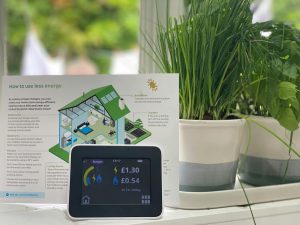
An energy monitor shows you in real time how much electricity your home is using and what it is costing. For most households, this information is invisible until the bill arrives – which makes it almost impossible to know which habits are worth changing and which are not. Energy monitors fix that by making consumption visible at the point it is happening. When you can see that running the tumble dryer for an hour is adding noticeably to the day’s total, or that the house is drawing a steady background load even when you think everything is switched off, it changes how you use energy in a way that reducing prices or urging people to be careful simply does not.
The UK market covers a range of approaches, from simple wireless clip-on sensors that transmit to a handheld display, to internet-connected whole-home monitors with app connectivity and per-device data, to individual smart plugs that measure the consumption of a single appliance. Households with a smart meter already have access to basic real-time usage data through an In-Home Display provided free by their energy supplier. Understanding where an IHD is sufficient and where a dedicated monitor adds genuine value is the first question to answer before buying anything.
Do energy monitors actually save money?
The research on energy monitors and behaviour change is consistent. Households with real-time energy monitors reduce their electricity consumption compared to those without, and the reduction is driven primarily by increased awareness of which activities consume the most electricity. The mechanism is straightforward: most people have no intuitive sense of which appliances draw significant power and which do not. An energy monitor makes that legible in real time, without requiring any sustained effort or willpower to maintain the savings.
The savings are not guaranteed – they depend entirely on acting on the information the monitor provides. A monitor left on a kitchen surface that nobody looks at delivers no savings at all. But for a household that engages with the data, the financial return can be substantial over time. The upfront cost of a basic whole-home monitor is typically recovered within the first year or two. The appliance comparisons that tend to drive the most change are the ones that reveal which devices have a permanently high standby load, which appliances are significantly less efficient than their replacements would be, and which daily habits have a higher cost than most households expect.
Smart meter IHD vs standalone monitor
If you already have a second-generation smart meter installed, your energy supplier is required to offer a free In-Home Display that shows real-time electricity and gas consumption in pounds and pence. For many households this is sufficient. The IHD updates frequently, shows current consumption in pounds and pence as well as watts, and can be supplemented by the supplier’s app for historical data. It costs nothing extra and requires no installation beyond accepting the offer from your supplier.
The limitations of an IHD become relevant in specific situations. IHDs only show whole-home total consumption – they cannot break down usage by appliance or device. They cannot be taken out of the home or integrated with third-party apps. They require a smart meter that is communicating correctly, which is not always the case in flats or properties with unusual meter locations. And some suppliers’ IHDs are poorly designed and harder to read than a well-designed standalone monitor.
A standalone whole-home monitor is worth buying if you do not have a smart meter, if your IHD is not working correctly, or if you want a dedicated always-on display rather than checking an app. The best standalone monitors are more readable than many IHDs, work with any meter type including older non-smart meters, and add features like historical data logging, tariff alerts and better app integration. For solar panel owners, a dedicated monitor with dual-clamp sensing or a solar-specific model is essential because a standard IHD or single-clamp monitor will show inaccurate consumption data when panels are generating.
Types of energy monitor
Clamp-based whole-home monitors work by fitting a current sensor around the live wire feeding from the electricity meter. The sensor transmits wirelessly to either a display unit or a network gateway. Installation is straightforward and requires no tools or electrical knowledge – you clip the sensor around the cable and pair it with the display or gateway. These monitors show whole-home electricity consumption in real time, updating every few seconds, and the more capable models add internet connectivity for app access and historical data.
Smart plugs with energy monitoring are a different category. Rather than measuring whole-home consumption, each plug monitors the single appliance connected to it and reports that device’s usage to an app. A smart plug on the tumble dryer tells you exactly how much electricity each cycle uses. A smart plug on the fridge-freezer reveals if it is drawing more power than a modern efficient model would. Used on the highest-draw appliances in the home – washing machine, tumble dryer, dishwasher, fridge-freezer, electric oven, gaming equipment – a small set of monitoring smart plugs provides more actionable information than a whole-home monitor alone, because it identifies specifically where the electricity is going rather than showing the total.
The two approaches complement each other well. A whole-home monitor gives constant awareness of total consumption and makes it immediately obvious when something high-draw switches on. Smart plugs on the main appliances identify the per-cycle or per-day cost of each specific device. Together they give a complete picture of household consumption that makes the case for any behaviour change or appliance upgrade much more concrete.
Owl Intuition-e – best overall
The Owl Intuition-e is the strongest whole-home monitor on the UK market for households wanting internet-connected monitoring. It uses the same clamp sensor approach as other Owl monitors, but adds a network gateway that plugs into your broadband router via ethernet, connecting to the Owl cloud platform and providing real-time data, daily and weekly usage charts, cost breakdown by time period, and the ability to set alerts when consumption exceeds a threshold you define. You can view your data from any web browser and via the Owl app on your phone. The cloud platform is free for two years from purchase, after which a subscription is required to maintain access to historical data and app functionality.
Setup requires entering your electricity tariff into the account settings, which takes a few minutes but ensures the cost figures are accurate to your actual rate rather than a national average. The app is available on both iOS and Android. The Intuition-e works with any standard single-phase UK domestic electricity supply and any meter type including older non-smart meters – it does not require a smart meter. The clamp sensor is installed at the meter, typically in a cupboard under the stairs or utility room, and the wireless transmitter sends the signal to the network gateway nearby.
The Intuition-e is the most capable standalone whole-home monitor available for UK households without a smart meter, or for those who want dedicated monitoring beyond what an IHD provides. The network gateway connects to your router, uploads consumption data continuously to the Owl cloud, and makes everything accessible from any device via browser or app. It handles Economy 7 and timed tariffs as well as flat-rate, and can be upgraded to three-phase monitoring with additional sensors.
The cloud platform is free for the first two years then requires a subscription, which is worth factoring into the total value calculation. For households that will actively use the historical data and app features over multiple years, the ongoing cost is modest relative to the savings a well-used monitor typically delivers. For households who want a no-subscription setup, the Owl Micro+ is a better fit.
As an Amazon Associate I earn from qualifying purchases.
Owl Micro+ – best budget
The Owl Micro+ is the straightforward no-subscription entry point in the Owl range. It is a clamp sensor monitor with a wireless handheld display that shows current consumption in kilowatts and the estimated daily, weekly and monthly cost at your entered tariff rate. There is no internet connectivity, no app and no cloud service – the unit is entirely self-contained, which is both a limitation and an advantage. The limitation is obvious: no remote access and no long-term historical data beyond averages stored on the display. The advantage is that it will work indefinitely without any concern about subscription charges, app support being discontinued or server outages.
For a household that simply wants an always-on display in the kitchen showing current consumption, the Micro+ delivers exactly that without any complexity. The display is clear and easy to read. Setup takes a few minutes. The battery in the transmitter is rated to last more than 14 months. It is the right choice for households where simplicity and low ongoing cost matter more than data logging. It also supports Economy 7 and block tariffs as well as flat-rate, and stores average and historical consumption data by day, week and month on the display itself.
The Micro+ does one thing well: it shows you what you are spending on electricity right now, clearly and reliably, without any app, account or internet connection required. It works with any UK electricity meter, supports multiple tariff types and has a transmitter battery life of more than 14 months. For a household new to energy monitoring, it is an excellent starting point that removes all the setup friction and delivers immediate awareness.
As an Amazon Associate I earn from qualifying purchases.
TP-Link Tapo P110 – best per-appliance monitor
The TP-Link Tapo P110 is a Wi-Fi smart plug with energy monitoring built in. It plugs between an appliance and the wall socket, measures the consumption of that specific appliance in real time, and reports it to the Tapo app on your phone. The app shows current power draw in watts, daily, weekly and monthly energy consumption in kWh, and estimated running cost based on your entered tariff rate. Data is stored historically so you can track trends over time – whether a washing machine that seemed expensive actually is, or whether the old second fridge in the garage is drawing significantly more than a modern equivalent would.
The P110 also functions as a smart plug – you can schedule it or switch it remotely via the app, which makes it useful for turning appliances off when not in active use or scheduling high-draw devices to run during cheaper off-peak tariff periods. Running three or four P110 plugs on the main appliances – washing machine, tumble dryer, dishwasher and fridge-freezer – gives more actionable per-device data than most whole-home monitors at a comparable or lower total cost.
The P110 occupies a different category to the whole-home monitors above but fills a role they cannot: precise per-device consumption data. For a household already covered by a smart meter IHD for whole-home awareness, two or three P110 plugs on the highest-draw appliances completes the picture at very low total cost. The Tapo app is well-designed, reliable and supports tariff entry for accurate cost calculations. The P110 requires a Wi-Fi connection at the plug location and a smartphone with the app installed.
As an Amazon Associate I earn from qualifying purchases.
What to look for when buying
The most important specification for a whole-home monitor is how it handles tariff entry. A monitor that uses a fixed default rate rather than your actual tariff will show inaccurate cost figures, which undermines the entire point of the device. Check that the model allows you to enter your unit rate in pence per kWh, and for households on Economy 7 or other time-of-use tariffs, confirm the model supports multiple rate periods before purchasing.
Use smart plugs alongside a whole-home monitor. A whole-home monitor tells you how much electricity the house is using in total. Smart plugs on specific high-draw appliances tell you exactly how much each one uses per cycle or per day. The combination gives a complete picture and makes it straightforward to identify which appliances are worth running differently or replacing.
Avoid monitors that require a monthly or annual subscription to access historical data or full app functionality from the outset. The data from your own meter should not come with ongoing charges as a starting condition. Several monitor brands have introduced subscription tiers after initial purchase; reading current reviews for subscription requirements before buying is worthwhile.
For households on time-of-use tariffs, a monitoring setup that combines whole-home awareness with per-device data from smart plugs gives you the clearest picture of where to shift consumption. Knowing that the dishwasher uses a particular amount per cycle, or that the washing machine at 60°C uses meaningfully more than at 40°C, makes it much easier to decide which loads are worth running during cheap-rate periods and which are not. A whole-home monitor alone tells you the total; the smart plugs tell you which specific decisions to make.
The appliances that benefit most from individual monitoring are those with variable usage patterns or those where you suspect consumption may be higher than expected. A washing machine that runs at different temperatures, a tumble dryer where cycle length varies, an ageing fridge-freezer that cycles more frequently than a modern efficient one, and any always-on entertainment or gaming equipment are the usual candidates. Once you have accurate per-appliance data for a few weeks, you have a reliable picture of where the electricity budget is going and which changes – whether to habits, settings or appliance replacement – would have the most impact per pound spent.
A final consideration for anyone buying their first energy monitor is to make sure it actually gets used once installed. The most common reason monitors fail to deliver savings is that they are installed and then ignored. Placing a display unit in a visible location – kitchen worktop, near the kettle, somewhere it is seen multiple times a day – makes a significant difference to engagement compared to one tucked away or relying solely on an app that only gets opened occasionally. For app-based monitors, setting a daily consumption alert threshold is a useful way to recreate that passive awareness even when you are not actively checking the data. The monitor itself is only the starting point; the savings come from the habit of noticing what it tells you and acting on it consistently over time.
Share on socials: